
Deploying digital signage behind a retail display window, inside a luxury showcase box, or within an interactive museum exhibit introduces engineering challenges that traditional display monitors never encounter. Standard commercial displays focus exclusively on emitting bright visuals against an opaque backlight. Conversely, see-through digital signage must deliver crisp graphical overlays while maintaining optical transparency, allowing viewers to inspect physical objects situated directly behind the glass screen.
A transparent display is not simply a normal monitor with a clear background; the physical environment is part of the visual system.
Procurement managers, AV system integrators, and retail concept engineers searching for a transparent touch screen monitor frequently discover that selecting hardware requires evaluating more than screen resolution. Successfully integrating an interactive transparent display demands an understanding of emissive pixel physics, surface touch technologies, background illumination, structural enclosure customization, and specialized UI content design. Aligning these technical variables during the initial project planning phase prevents costly site retrofits, protects hardware reliability, and ensures maximum visual impact for commercial installations.
What Is Transparent Digital Signage?
Evaluating transparent commercial display hardware requires distinguishing between raw display panels, integrated touch monitors, and complete turnkey signage solutions. Misinterpreting these architectural levels often creates specification misalignments between system integrators and commercial hardware manufacturers.
Transparent Display Panel
The display panel forms the optical foundation of the system. This component comprises the glass substrate, emissive pixel matrix, driver ICs, and interface flexible printed circuits (FPC). Its sole function is generating graphical images while preserving a defined percentage of light transmission, enabling viewers to see through the active display area.
Transparent Touch Screen Monitor
A transparent touch screen monitor combines the see-through panel assembly with an interactive touch sensor overlay, driver electronics, and protective glass encapsulation. Integrators deploy these interactive units in high-engagement environments to support:
- Interactive product catalog browsing in retail showcases
- Detailed specification exploration for luxury merchandise
- Historical timeline navigation in museum artifact cases
- Interactive functional simulations in corporate innovation hubs
- Dynamic wayfinding and educational exhibit exploration
Transparent Digital Signage Solution
A turnkey transparent signage display solution integrates the interactive display monitor into a complete, field-ready commercial hardware unit. This complete engineering assembly includes protective sheet metal or aluminum chassis housing, embedded media players running Android or Windows operating systems, internal power delivery, thermal management channels, custom mounting structures, and specialized content management software integration.
Transparent Display Panel → Transparent Touch Screen Monitor → Complete Transparent Digital Signage Solution
Transparent OLED vs. Transparent LCD vs. Transparent LED
Choosing the underlying display architecture dictates how the screen interacts with ambient light and physical backdrops. Hardware buyers must evaluate each technology against site lighting, viewing distance, enclosure depth, and project budgets.
Technological Comparison
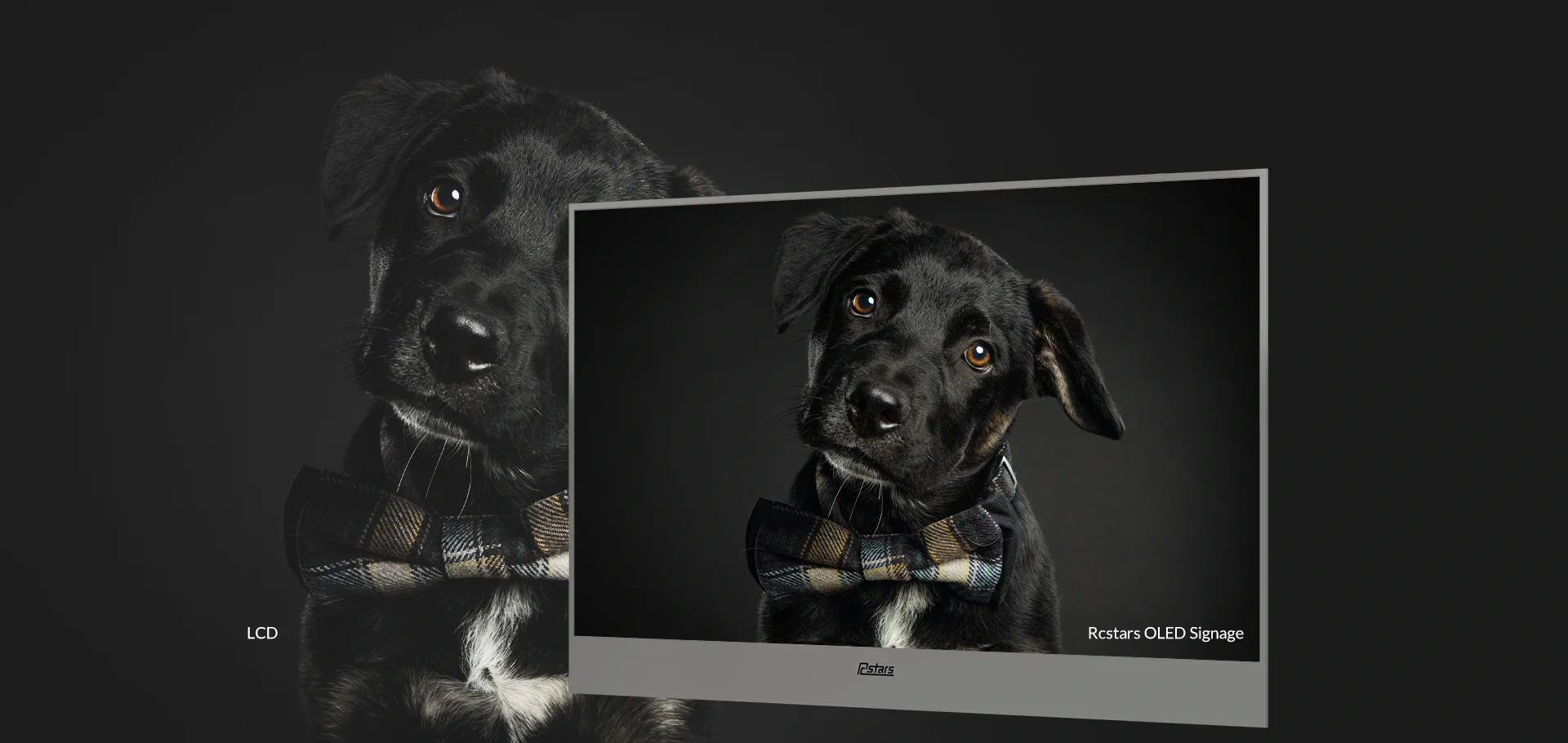
Transparent OLED technology utilizes self-emissive organic pixels embedded directly on a clear glass substrate. Because OLED pixels emit their own light independently, unlit pixels remain naturally transparent without requiring an external backlight module. This self-emissive property allows a custom transparent OLED display to deliver vibrant graphics superimposed directly over physical products without obscuring background details.
Transparent LCD technology relies on liquid crystal panels that do not emit light on their own. Displaying graphics on a transparent LCD screen requires external or internal enclosure lighting to illuminate the liquid crystal layer from behind or inside a sealed showcase box. Without controlled internal lighting, transparent LCD images appear dim and washed out.
Transparent LED displays and transparent LED films feature surface-mounted LED diodes arranged along transparent strip grids. While transparent LED walls achieve high transparency ratings and high brightness outputs, their wider pixel pitch spacing makes them suitable primarily for large-scale building facades, atrium glass walls, and storefront window displays viewed from medium to long distances.
| Evaluation Dimension | Transparent OLED | Transparent LCD | Transparent LED / Film |
|---|---|---|---|
| Light Emission Mechanism | Self-emissive pixels; no backlight matrix required | Non-emissive liquid crystal; requires rear/internal lighting | Surface-mounted LED pixel diodes on strip matrix |
| Typical Deployment Scale | Medium commercial sizes (e.g., 55-inch display units) | Sealed product showcase boxes & embedded counters | Large-format architectural glass walls & storefronts |
| Close-Up Viewing Clarity | Outstanding pixel density for close inspection | Moderate to high clarity depending on internal lighting | Optimized for long-distance viewing due to pixel pitch |
| Physical Product Superposition | Direct visual overlay without physical enclosure constraints | Requires depth-controlled showcase box with rear lights | Ideal for large glass facades and building windows |
| Touch Integration Capability | Compatible with PCAP and IR touch sensor overlays | Compatible with integrated touch frame overlays | Requires custom frame structure for touch interaction |
| Primary Hardware Limitations | Content planning required for static element management | Demands controlled showcase enclosure & interior light | Lower pixel resolution for close-up text reading |
Swipe horizontally to view the complete comparison table on smaller screens.
How Does a Transparent Touch Screen Monitor Work?
Interactive see-through digital signage treats visual display and touch sensing as two distinct, complementary engineering layers. The transparent display panel generates the graphical layer, while an overlay sensor detects user inputs and passes coordinates to the media engine.
PProjected Capacitive touch overlays integrate an invisible conductive sensor grid directly behind protective tempered glass. PCAP technology detects touch events by measuring minute changes in electrical capacitance when a finger approaches the glass surface. Key advantages include:
- Completely flat, bezel-free front glass design that preserves sleek aesthetic profiles
- Support for multi-touch gestures, including pinch, zoom, and multi-layer menu navigation
- High optical clarity that maintains underlying display transparency
- Excellent resistance to surface dust, moisture, and commercial wear
When evaluating PCAP overlays for transparent display applications, engineers must test touch sensitivity calibration if the deployment requires thick protective cover glass or specialized anti-glare coatings.
Infrared Touch (IR)
Infrared touch technology utilizes a physical bezel frame lined with emitting LEDs and receiving phototransistors. This configuration creates an invisible grid of infrared light beams across the display surface. Touching the screen interrupts specific light beams, registering precise X/Y input coordinates. Infrared touch frames offer cost-effective touch integration for larger display formats and function reliably when operated with gloved hands or stylus pens. However, the raised perimeter bezel required to house the infrared sensors adds physical depth to the screen edge and requires careful maintenance to keep the light sensors free of dust accumulation in public venues.
Optical Bonding Considerations
Optical bonding fills the air gap between the display panel, touch sensor, and outer cover glass using an optically clear adhesive. For specialized interactive displays, optical bonding reduces internal light reflection, eliminates visual parallax between digital touch targets and physical background objects, and increases overall glass impact resistance. However, because optical bonding requires specialized cleanroom manufacturing processes, integrators should confirm with their transparent touch screen monitor supplier whether optical bonding is required for their specific panel size and enclosure structure.
The Specifications That Matter Most
Evaluating technical datasheets for transparent display hardware requires understanding how physical specifications impact real-world performance. Focusing on critical operational metrics prevents integration issues during field deployment.
Transparency Rating
Transparency indicates the percentage of light that passes through the display glass in its unlit state. Higher transparency ratings improve the visibility of physical products positioned behind the screen. However, perceived transparency depends directly on ambient light balance, physical background color, and graphical content brightness. Buyers should verify whether a manufacturer’s listed transparency rating applies to the bare glass panel alone or includes protective cover glass and touch overlays.
Brightness and Ambient Contrast
Screen brightness, measured in nits (cd/m²), determines graphical legibility under bright ambient lighting. While standard indoor displays operate effectively between 350 and 500 nits, high ambient lighting in retail storefronts or glass-roofed architectural spaces can overpower digital content if background contrast is unmanaged. Balancing screen brightness with strategic background spotlighting ensures digital text and animations remain sharp and readable.
Resolution and Viewing Distance
Matching screen resolution to viewer proximity is essential for interactive commercial applications. Close-up retail counter displays and interactive exhibit cases require Full HD (1920×1080) or 4K resolution to maintain crisp text legibility and smooth graphic animations when users stand within arm’s reach.
Touch Performance Metrics
When sourcing a transparent OLED touchscreen, procurement managers must evaluate touch response speed, supported touch points (e.g., 10-point or 20-point touch), driverless OS compatibility, and surface glass hardness. Confirming calibration procedures for public installations ensures consistent touch accuracy across extended operating periods.
Inputs, Media Players, and Operating Systems
Verify physical connectivity options, including HDMI, DisplayPort, USB touch channels, and LAN interface ports. Determine whether the project requires a display monitor configuration connected to an external industrial player or an integrated media engine running Android or Windows operating systems for remote content management system (CMS) deployment.
Mechanical and Installation Parameters
Document physical chassis dimensions, total unit weight, mounting hole patterns (VESA standards), cable routing channels, and active or passive heat dissipation paths. Ensuring adequate ventilation within custom cabinetry protects electronic components and maintains panel longevity.
Where Transparent Digital Signage Creates Real Value
Deploying interactive transparent display hardware allows commercial enterprises to merge physical merchandise with dynamic digital storytelling. B2B buyers integrate transparent displays across several primary commercial environments:
Retail Product Showcases
Luxury retail boutiques, jewelry showcases, watch manufacturers, and consumer electronics brands utilize transparent product showcases to overlay technical specifications, pricing details, and promotional animations directly over physical items. Customers can touch screen options to compare models, explore color variants, or view manufacturing heritage videos without losing line of sight to the physical product.
Museums and Exhibitions
Cultural institutions and trade exhibition spaces position see-through digital signage in front of historical artifacts and complex physical models. Interactive overlays display historical annotations, animated structural cutaways, multilingual commentary, and archival imagery, enriching the visitor experience while protecting sensitive artifacts inside climate-controlled glass enclosures.
Corporate Showrooms
Technology firms, automotive engineering centers, and industrial manufacturers deploy transparent displays in executive briefing centers and innovation showrooms. Superimposing interactive schematics, real-time telemetry data, and functional animations over physical engine components or prototype hardware demonstrates complex technical capabilities effectively.
Hospitality and Premium Interiors
Boutique hotels, flagship dining venues, and executive reception areas incorporate transparent display screens into glass partitions, service counters, and architectural bar displays. Subtle digital graphics, menu highlights, and ambient visual branding elevate interior aesthetics while preserving spatial openness and sightlines.
Trade Shows and Product Launches
Exhibitors deploy interactive transparent display kiosks to capture visitor attention on crowded trade show floors. Combining physical prototype samples with dynamic touch-driven feature breakdowns encourages longer booth dwell times and drives lead generation.
Content Design Rules for Transparent Displays
Designing graphics for a custom transparent OLED display differs significantly from creating content for standard opaque LCD monitors. On transparent OLED screens, pixel color dictates light transmission: pure black pixels (RGB 0,0,0) remain completely clear and transparent, while bright white pixels become opaque and block background visibility.
Installation Site Checklist
Preparing an installation environment thoroughly ensures seamless hardware mounting and optimal optical performance. AV integrators must evaluate several site factors prior to final hardware deployment:
Lighting Conditions
Analyze overhead lighting fixtures and window daylight paths around the installation site. Avoid placing unshielded spotlights directly behind the physical object pointing toward the screen, which can cause severe glare. Install dedicated, dimmable LED accent lights inside showcase structures to illuminate physical products evenly from controlled angles.
Background and Depth Spacing
Maintain proper physical depth between the rear of the transparent glass display and the front surface of the displayed merchandise. A spacing distance of 10 to 20 centimeters creates an engaging 3D optical depth effect while allowing sufficient room for internal showcase lighting and cleaning access.
Structural Mounting and Safety
Verify floor or wall load-bearing capacities for heavy glass units and metal chassis structures. Ensure that edge protection covers vulnerable glass corners in high-traffic public venues. Plan discrete cable management conduits to conceal power cords, network cables, and video signal lines.
Touch Ergonomics and Accessibility
Mount interactive displays so touch buttons sit between 90 and 130 centimeters from floor level, ensuring comfortable operation for diverse user heights and wheelchair accessibility standards. Confirm that floor-standing structures remain rigid and vibration-free during active touch interaction.
Maintenance Access
Design custom cabinetry and wall enclosures with concealed access doors or pull-out slide tracks. Maintenance technicians require quick access to media players, power supplies, reboot switches, and interior glass surfaces for routine cleaning.
How to Calculate Transparent Digital Signage ROI
Justifying commercial hardware investments requires building a comprehensive Total Cost of Ownership (TCO) model alongside clear key performance indicators (KPIs).
Defining Commercial Objectives and KPIs
Quantifying the value of a transparent display rollout depends on establishing clear site objectives. Key metrics include:
- Increases in customer dwell time at flagship retail display showcases
- Interactive touch engagement rates and session duration per visitor
- Content interaction conversions, such as QR code scans, product feature explorations, or brochure downloads
- Sales lift for featured high-margin products displayed behind interactive glass screens
Total Cost of Ownership (TCO) Structure
Evaluating capital expenditure (CAPEX) and operational expenditure (OPEX) provides an accurate picture of overall project investment:
- CAPEX Considerations: Transparent display monitor hardware, touch sensor integration, custom metal chassis fabrication, embedded media players, initial UI content design, shipping packaging, and physical installation labor.
- OPEX Considerations: Electricity consumption, ongoing CMS software licensing, periodic UI content updates, preventative cleaning, and long-term technical support.
Practical ROI Calculation
A standardized ROI formula evaluates overall financial returns:
$$\text{ROI} = \frac{(\text{Attributable Gross Profit Margin} + \text{Operational Savings}) – \text{Total Project Cost}}{\text{Total Project Cost}} \times 100\%$$
Deploying a single pilot kiosk in a flagship venue allows retail operators and brand managers to gather baseline engagement data and refine UI content before executing multi-site commercial rollouts.
How to Evaluate a Transparent Display Supplier
Partnering with an experienced commercial hardware manufacturer minimizes technical risk and ensures reliable hardware delivery. B2B buyers must audit prospective suppliers across core manufacturing capabilities:
Critical Supplier Evaluation Criteria
- Manufacturing Ownership: Verify whether the supplier operates internal metal fabrication and assembly workshops or functions as a trading vendor.
- Technical Engineering Documentation: Demand detailed 2D/3D CAD structural drawings, dimensional schematics, and clear thermal management specifications.
- Testing and Quality Verification: Confirm that the manufacturer enforces rigorous testing procedures, including mandatory 100% 48-hour burn-in aging tests for all completed displays.
- Regulatory Compliance: Ensure the factory provides verifiable regional compliance documentation, including official CE, FCC, and RoHS certificates.
- Delivery Transparency: Require distinct timeline commitments for sample prototyping, pre-production pilot runs, and volume mass production schedules.
Supplier Red Flags to Avoid
Avoid vendors that rely exclusively on promotional renders without providing formal engineering datasheets. Be cautious of suppliers making unverified claims about universal outdoor applicability, promising impossible lead times, or attempting to pass off raw display panel certificates as complete product safety certifications.
How Rcstars Supports Transparent Display Projects
Navigating the technical requirements of custom commercial hardware demands an experienced OEM/ODM partner. Rcstars Industrial (Shenzhen) Co., LTD. delivers complete digital signage manufacturing solutions engineered specifically for global B2B clients, importers, and AV system integrators.
Operating an advanced manufacturing facility spanning over 10,000 square meters in Shenzhen, Rcstars manages complete in-house sheet metal chassis fabrication, structural engineering, electronic assembly, and quality testing. Direct manufacturing oversight eliminates trading markups and guarantees strict production consistency across custom builds.
Rcstars offers specialized see-through commercial display hardware, including the 55-inch Transparent OLED Signage series (RCS-550XM standard display and RCS-550XML interactive transparent OLED model). Featuring approximately 40% optical transparency, Full HD resolution, 500 cd/m² panel brightness, and versatile mounting options including floor-standing and wall-mount chassis configurations, these commercial units deliver vibrant visuals for retail, hospitality, and exhibition environments.
Rcstars provides comprehensive OEM/ODM customization options, tailoring metal enclosure styles, custom powder-coat finishes, branding logos, PCAP touch integration, and Android or Windows system hardware. Every unit undergoes a triple IQC, IPQC, and QA testing process backed by a mandatory 100% 48-hour burn-in aging test. Holding official CE, FCC, and RoHS certifications, Rcstars exports over 80% of its production to international markets across North America, Europe, and Asia, offering fast 15-day dispatch options for standard hardware configurations.
Transparent Display RFQ Checklist
Submitting a thorough project brief ensures accurate pricing and fast engineering evaluation. Prepare the following details when requesting a quotation from a transparent touch screen monitor supplier:
- Application Environment: Retail showcase, museum exhibit, corporate showroom, or trade exhibition
- Required Display Quantity: Initial prototype sample volume and estimated annual mass production units
- Hardware Configuration: Screen size, transparency preference, touch overlay requirements (PCAP non-touch glass)
- Mounting Style: Floor-standing kiosk, wall-mount chassis, ceiling suspension, or custom showcase embedment
- Physical Object Dimensions: Size, height, and depth measurements of products sitting behind the glass
- System Architecture: Android, Windows, or monitor-only configuration with external media player inputs* Destination Details: Destination country, mandatory compliance certifications (CE, FCC, RoHS), and target delivery dates
- * Destination Details: Destination country, mandatory compliance certifications (CE, FCC, RoHS), and target delivery dates
Frequently Asked Questions About Transparent Digital Signage
What is transparent digital signage?
Transparent digital signage is a commercial display technology that shows dynamic digital graphics, videos, and text overlays while maintaining optical transparency through the glass. This see-through capability allows viewers to inspect physical objects positioned behind the screen while simultaneously viewing digital content.
How does a transparent OLED display work?
A transparent OLED display utilizes self-emissive organic pixels layered across clear glass substrates. Because OLED pixels generate their own light without requiring an opaque backlight matrix, unlit pixels remain naturally clear, allowing light and background images to pass through the active screen area.
Can a transparent display include touch functionality?
Yes, commercial display manufacturers integrate Projected Capacitive (PCAP) or Infrared (IR) touch sensor overlays onto transparent displays, creating interactive touch screen monitors ideal for product exploration, digital menus, and self-guided exhibits.
Is transparent OLED better than transparent LCD?
Transparent OLED offers superior optical clarity, wider viewing angles, and direct physical superposition because it requires no bulky backlight box. Transparent LCD requires an enclosed showcase structure with internal rear lighting to illuminate liquid crystals. Selecting the optimal technology depends on showcase design, ambient light control, and project budgets.
Can transparent digital signage be used outdoors?
Standard indoor transparent displays are not engineered for direct outdoor weather exposure. Direct sunlight can overpower screen graphics, while moisture and thermal buildup risk damaging sensitive display glass. Outdoor applications require specialized high-brightness LED grids or custom IP65-rated weather-sealed enclosures with integrated climate control systems.
What content works best on a transparent display?
High-contrast graphics, crisp white or vibrant colored text, dynamic outline animations, and UI layouts featuring solid black background canvases deliver outstanding visuals. Pure black content areas remain transparent, creating an engaging floating digital effect around physical merchandise.
What information is needed for a custom display quotation?
Receiving an accurate quotation requires providing target screen sizes, required touch functionality, enclosure mounting style, showcase dimensions, mainboard/OS preferences, total order volume, delivery timelines, destination country, and mandatory regional compliance certifications.
How should procurement managers evaluate transparent display suppliers?
Evaluate suppliers by confirming physical factory manufacturing ownership, requesting official 2D/3D structural CAD drawings, verifying triple quality control workflows with mandatory 48-hour burn-in testing, and confirming authentic CE, FCC, and RoHS certification documentation.
Integrating see-through display monitors requires planning visual content, physical merchandise, and structural hardware as an interconnected visual system. By selecting the appropriate display technology, confirming ambient lighting conditions, adhering to emissive content design rules, and partnering with an established OEM/ODM manufacturer, commercial enterprises can deploy memorable interactive showcases that drive customer engagement and elevate brand value. Contact the engineering team at Rcstars with your installation schematics and project requirements to evaluate custom transparent digital signage options for your next rollout.
Contact the Rcstars engineering team with your installation schematics and project requirements to discuss custom transparent digital signage options for your next rollout.